Risk Spectrum PSA (Output)
Overview
FRI3D provides a comprehensive 3D fire and hazard modeling environment that integrates directly with RiskSpectrum PSA, a leading probabilistic safety analysis (PSA/PRA) software used for risk evaluation in the nuclear, energy, and industrial safety domains.
This integration bridges physics-based fire simulations with probabilistic risk analysis, allowing users to quantify the impact of fire scenarios on plant systems and components, evaluate failure propagation, and compute resulting changes in Core Damage Frequency (CDF) or Large Early Release Frequency (LERF).
Concept of Fire Modeling in PSA and FRI3D
There are multiple approaches to integrating fire events into a PSA/PRA model. Fire scenarios may be:
- Added directly into fault trees and quantified as new initiating events.
- Incorporated into fire-specific event trees to define conditional sequences.
- Linked as modified initiating events within existing event trees.
A fire model typically consists of a collection of “Full room burnup” scenarios or sets of
individual fire source scenarios for each compartment or area.
Each fire scenario is treated as an initiating event characterized by its frequency, severity, and non-suppression probability.
During quantification, the components that fail within each scenario are represented as
Basic Events (BEs) set to a probability of 1.0.
The difference in total CDF between the base case and the fire-augmented case indicates the
incremental fire-induced risk.
FRI3D ↔ RiskSpectrum PSA Integration Workflow
| Step | Description |
|---|---|
| 1. Scenario Definition | Fire scenarios are created in FRI3D by the user or imported from an existing RiskSpectrum project. |
| 2. Simulation Execution | FRI3D simulates the scenario and determines affected cable trays, damaged components, and failed basic events. |
| 3. Scenario Analysis | User reviews simulation results and defines ignition frequency, severity factors, and non-suppression probabilities. |
| 4. Export to RiskSpectrum | FRI3D prepares and exports the modified PRA data for import into RiskSpectrum. |
| 5. Quantification | RiskSpectrum executes the event/fault tree analysis for all fire scenarios, calculating overall risk contributions. |
In view of the above steps the following detailed steps are outlined to run a fire PRA/PSA in RiskSpectrum via FRI3D.
Model Preparation (Needs to be done manually in RiskSpectrum)
A few pre-requisites are needed before fire modeling can be performed. To simplify calculations, Risk Spectrum allows you to create an analysis case group. A new group needs to be created to put all the individual analysis cases under, so they can all be solved at the same time . A fire basic event also needs to be added with the frequency of 1.0. This event will be substituted for all the failed basic events for a scenario, likely causing an increased probability for the cut sets using those events when the fire scenario is quantified.
Integration with RiskSpectrum model.(Automatically done by FRI3D)
To create or add scenarios from FRI3D to the RiskSpectrum model the following steps are performed automatically by FRI3D.
- Use the Risk Spectrum Macro commands to export the base project that the user has specified links to the FRI3D model to a temporary work location using the excel output feature in Risk Spectrum.
- Add the fire exchange event to substitute for the basic events that fail due to fire.
- Create a fire analysis case group so that all the fire scenarios can easily be calculated.
- For each FRI3D fire scenario the user wants to calculate do the following:
- Create a house event for the scenario.
- Link the house event and the fire exchange event for each basic event in the scenario.
- Copy the analysis case this fire scenario is based upon as a new fire analysis case.
- Add the fire analysis case to the fire analysis case group
- Create a boundary condition to include this fire scenario
- Save the modified Excel sheets
- Run the Risk Spectrum Macro commands to import the modified PRA Excel sheets
- Open RiskSpectrum to solve and execute the fire analysis case group
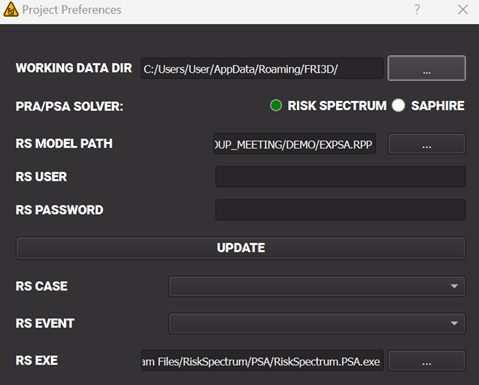
FRI3D/Risk Spectrum Preferences (Manually done by the user in FRI3D)
Appropriate modifications to the FRI3D interface was made to accommodate Risk Spectrum output, these included specification of the Risk Spectrum master PSA file, the user credentials , analysis case and the initiating event.
RS Setup Preferences
RiskSpectrum Fire PSA Model
In Risk Spectrum PSA, all the fire related events corresponding to FRI3D are created with a prefix FI. The house events are created for each fire scenario run. For example: FI_FSOURCE_1_CFAST and FI_SGR-A_FULLROOM are created which are exchanged with the corresponding basic events. could be examples of a fire scenario with a fire at one section of a room and a full room burnout.
The house events from the scenario are exchanged with these basic events via Exchange Events in RiskSpectrum.
RiskSpectrum Fire PSA Model Structure
Within RiskSpectrum, FRI3D-generated fire events are named and structured consistently to allow automatic linking and analysis.
| Type | Naming Convention | Description |
|---|---|---|
| Fire Event Prefix | FI_ | Identifies fire-originated scenarios (e.g., FI_FSOURCE_1_CFAST, FI_ROOM_FULLBURN). |
| House Events | FI_<ScenarioName> | Scenario-specific events activated when the scenario is quantified. |
| Exchange Events | EX_<ComponentID> | Used to replace failed components in fire cases. |
For example:
FI_FSOURCE_1_CFAST→ represents a localized fire in one zone.FI_SGR-A_FULLROOM→ represents a full room burnout in Sub-Generator Room A.
These house events are exchanged with the corresponding basic events via Exchange Events in RiskSpectrum.
This mechanism enables the model to activate appropriate failure combinations during quantification.
Example Workflow Illustration
flowchart LR
A[FRI3D Fire Scenario Simulation] --> B[Identify Failed Components & Zones]
B --> C[Generate House and Exchange Events]
C --> D[Export Modified PRA Data (Excel/XML)]
D --> E[Import into RiskSpectrum PSA]
E --> F[Quantify Fire Analysis Case Group]
F --> G[Compute Fire-Induced ΔCDF and ΔLERF]
Key Outputs
| File | Description |
|---|---|
| FRI3D_RiskSpectrum_FireScenarios.xlsx | Contains generated house and exchange events for each scenario. |
Notes on Frequency and Severity Inputs
Each scenario exported from FRI3D includes parameters defined by the user:
| Parameter | Description | Example |
|---|---|---|
| Ignition Frequency (λ) | Frequency of the initiating fire event. | 1.2E-4 per year |
| Severity Factor (SF) | Represents the proportion of fires reaching the modeled severity. | 0.3 |
| Non-Suppression Probability (NSP) | Probability that suppression fails. | 0.1 |
| Conditional Core Damage Probability (CCDP) | Output from RiskSpectrum quantification. | Computed post-analysis |
The combined product of these parameters defines the Fire CDF contribution:
Fire_CDF = λ × SF × NSP × CCDP
Reliability and Validation
- Integration tested against **RiskSpectrum PSA 1.6 **.
- Uses standard Excel interface macros for safe model import/export.
- Supports multi-scenario batch processing.
- Validation recommended after import to confirm correct event linkages.
- All exported events are traceable back to their originating FRI3D zone and simulation timestamp.
Summary
- FRI3D exports fire scenario data, equipment failures, and probability modifiers directly into RiskSpectrum-compatible Excel workbooks.
- Each scenario can be quantified as a unique analysis case in RiskSpectrum.
- The integration provides a seamless bridge between physical simulation and probabilistic safety modeling.
- Results can be used to derive fire risk metrics, prioritize mitigation actions, and refine safety case justifications.
References
-
RiskSpectrum PSA User Manual (v2.2) — RiskSpectrum AB
https://riskspectrum.com -
FRI3D Fire PRA Export Guide — Internal Technical Note, Centroid LAB, 2025.
Describes event mapping, macro automation, and validation workflow. -
NUREG/CR-6850 — Fire PRA Methodology for Nuclear Power Facilities, U.S. NRC / EPRI.
Standard reference for fire PRA quantification.
⚠️ Disclaimer:
RiskSpectrum export functionality in FRI3D automates scenario and event generation for fire PSA.
Since user-defined event trees and macros can vary between installations, exported cases should always be verified within RiskSpectrum prior to quantification or regulatory submission.