Plant Information and Logic Import (Excel)

FRI3D supports importing plant information databases from Microsoft Excel files. These databases contain comprehensive information about facility components, zones, cables, raceways, and fire scenarios, enabling detailed fire risk analysis and probabilistic risk assessment (PRA) integration.


Introduction#

Plant information databases contain all of the main items in a facility, including:

  • Zones and compartments - Physical locations and fire barriers
  • Raceways - Cable trays, conduits, and routing systems
  • Components - Equipment, devices, and plant systems
  • Cables - Electrical cables and their routing
  • Fire scenarios - Ignition sources and fire event definitions
  • PRA data - Basic events, spurious events, and probability data

The plant information is used to determine what items are physically located in zones or compartments. While these items can be included in the 3D model and part of the simulations, they are typically not part of the simulation results calculations themselves, but rather used for risk analysis and PRA integration.

While generalized fire logic data does not distinguish between different types of raceways, custom plant information can. For example, a plant may distinguish between "Trays," "Conduits," and "Other Raceways." Plant information can also add sources to FRI3D for existing scenarios, as FRANX has no source information.


Excel File Structure#

FRI3D expects Excel files (.xls or .xlsx) with multiple worksheets, each containing specific types of plant data. The worksheets must be named exactly as specified below, and columns must follow the defined structure.

Note: Plant-specific implementations should contact FRI3D support for assistance with importing their specific database formats.


Worksheets and Column Definitions#

Zones#

The Zones worksheet defines physical zones or compartments in the facility.

Column #Column HeaderData TypeNotes
1ZoneTextZone identifier (unique)
2DescriptionTextFree-text description of the zone
3CADDataTextStored as zonecad in FRI3D

Example:

Zone | Description | CADData
--------------|--------------------------|----------
ZONE_001 | Main Control Room | CTRL_ROOM_01
ZONE_002 | Turbine Hall | TURB_HALL_A

ZonesTo#

The ZonesTo worksheet defines relationships from zones to other items.

Column #Column HeaderData TypeNotes
1ZoneTextSource zone identifier
2ToItemTextTarget item identifier
3ToItemTypeTextTarget type (Zone, Raceway, Component, etc.)

Purpose: Establishes connections between zones and other plant items (raceways, components, cables, etc.).

Example:

Zone | ToItem | ToItemType
----------|---------------|------------
ZONE_001 | RACEWAY_01 | Raceway
ZONE_001 | COMP_001 | Component

Raceways#

The Raceways worksheet defines cable raceways (trays, conduits, etc.).

Column #Column HeaderData TypeNotes
1RacewayTextRaceway identifier (unique)
2DescriptionTextFree-text description
3TypeTextExpected values: CONDUIT, TRAY, OTHER
4InPRABoolean/TextTRUE/true/1/Y/y treated as true

Purpose: Defines cable routing infrastructure. The Type field allows distinction between different raceway types for plant-specific analysis.

Example:

Raceway | Description | Type | InPRA
------------|-------------------|----------|-------
RACEWAY_01 | Main Cable Tray | TRAY | TRUE
RACEWAY_02 | Conduit A-B | CONDUIT | FALSE

RacewaysTo#

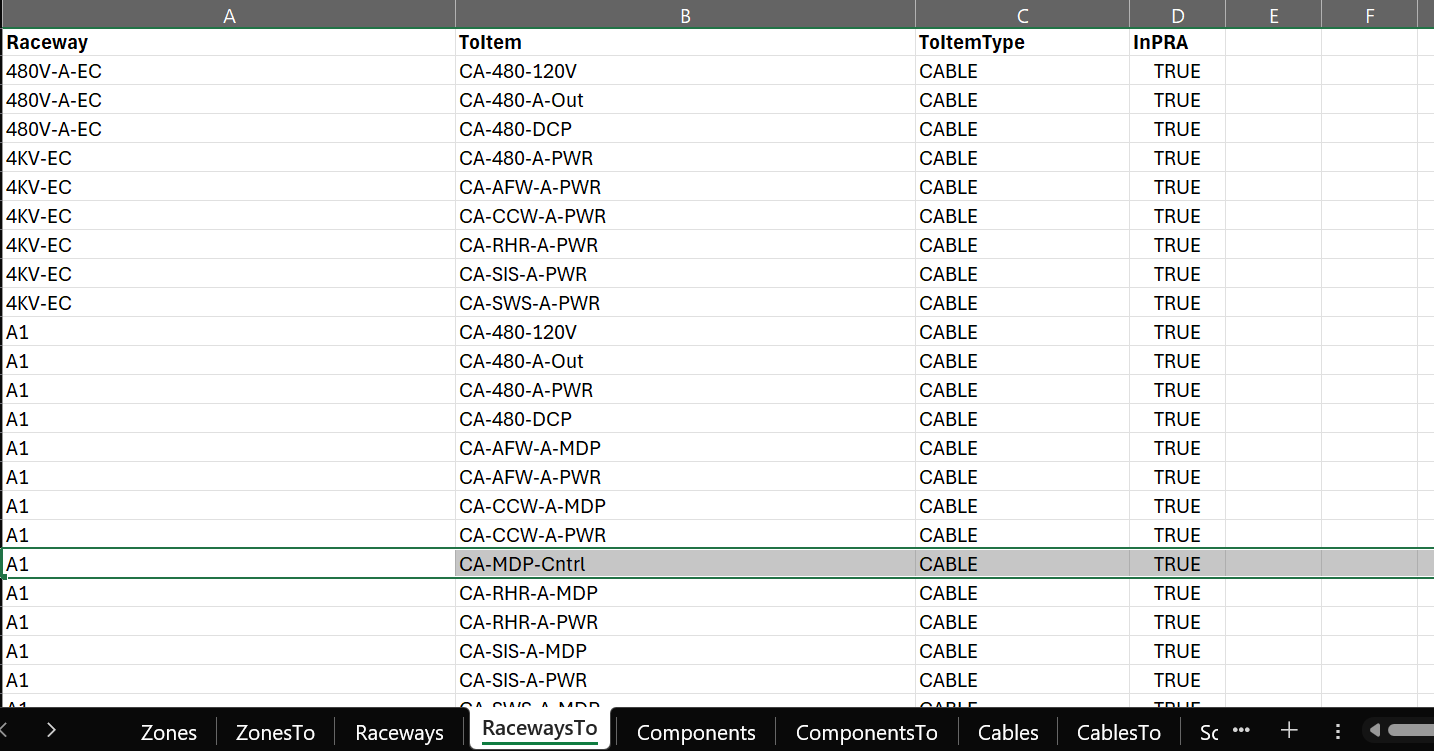
The RacewaysTo worksheet defines relationships from raceways to other items.

Column #Column HeaderData TypeNotes
1RacewayTextSource raceway identifier
2ToItemTextTarget item identifier
3ToItemTypeTextTarget type

Purpose: Establishes connections between raceways and zones, components, or other raceways.


Components#

The Components worksheet defines plant components and equipment.

Column #Column HeaderData TypeNotes
1ComponentTextComponent identifier (unique)
2DescriptionTextFree-text description
3(ignored)โ€”Column 3 is ignored by FRI3D
4InPRABoolean/TextColumn 4 is read; TRUE/true/1/Y/y treated as true

Important: Note that column 3 is ignored - the InPRA field is read from column 4.

Example:

Component | Description | (ignored) | InPRA
------------|-----------------------|-----------|-------
COMP_001 | Main Pump A | | TRUE
COMP_002 | Control Valve V-101 | | FALSE

ComponentsTo#

The ComponentsTo worksheet defines relationships from components to other items.

Column #Column HeaderData TypeNotes
1ComponentTextSource component identifier
2ToItemTextTarget item identifier
3ToItemTypeTextTarget type

Purpose: Establishes connections between components and zones, raceways, or other components.


Cables#

The Cables worksheet defines electrical cables in the facility.

Column #Column HeaderData TypeNotes
1CableTextCable identifier (unique)
2DescriptionTextFree-text description
3CableTypeIDTextCable type reference (links to CableTypes worksheet)
4InPRABoolean/TextTRUE/true/1/Y/y treated as true

Purpose: Defines individual cables and their types. The CableTypeID references cable type definitions (though the CableTypes worksheet is not currently parsed).

Example:

Cable | Description | CableTypeID | InPRA
------------|---------------------|-------------|-------
CABLE_001 | Power Cable A-B | TYPE_01 | TRUE
CABLE_002 | Control Cable C-D | TYPE_02 | FALSE

CablesTo#

The CablesTo worksheet defines relationships from cables to other items.

Column #Column HeaderData TypeNotes
1CableTextSource cable identifier
2ToItemTextTarget item identifier
3ToItemTypeTextTarget type

Purpose: Establishes connections between cables and zones, raceways, or components.


BasicEvents#

The BasicEvents worksheet defines PRA basic events.

Column #Column HeaderData TypeNotes
1BasicEventTextPRA basic event ID (unique)
2DescriptionTextFree-text description

Purpose: Defines basic events used in probabilistic risk assessment (PRA) analysis.

Example:

BasicEvent | Description
----------------|--------------------------
BE_FIRE_001 | Fire in Zone 1
BE_CABLE_FAIL | Cable failure event

SpuriousBasicEvents#

The SpuriousBasicEvents worksheet defines spurious basic events with probabilities.

Column #Column HeaderData TypeNotes
1SpuriousBasicEventTextSpurious BE ID (unique)
2DescriptionTextDescription
3*ProbabilityNumberโš ๏ธ Note: Code currently reads column 2 again (likely a bug)

Important: There is a known issue where the code currently reads column 2 (Description) again instead of column 3 (Probability). This may be addressed in future versions.

Purpose: Defines spurious basic events with associated probabilities for PRA analysis.


Scenarios#

The Scenarios worksheet defines fire scenarios with ignition and severity parameters.

Column #Column HeaderData TypeNotes
1ScenarioTextScenario identifier (unique)
2DescriptionTextFree-text description
3IGFNumberIgnition frequency
4SeverityFactorNumberSeverity multiplier
5NSPNumberNon-suppression probability

Purpose: Defines fire scenarios with key parameters for risk analysis:

  • IGF (Ignition Frequency): Frequency of fire ignition events
  • SeverityFactor: Multiplier for fire severity assessment
  • NSP (Non-Suppression Probability): Probability that fire suppression systems fail

Example:

Scenario | Description | IGF | SeverityFactor | NSP
------------|---------------------|--------|----------------|-------
SCN_001 | Electrical Fire | 1.0E-3 | 1.5 | 0.1
SCN_002 | Oil Fire | 2.0E-4 | 2.0 | 0.05

ScenariosTo#

The ScenariosTo worksheet defines relationships from scenarios to other items.

Column #Column HeaderData TypeNotes
1ScenarioTextSource scenario identifier
2ToItemTextTarget item identifier
3ToItemTypeTextTarget type

Purpose: Establishes connections between fire scenarios and zones, sources, or other items.


Sources#

The Sources worksheet defines fire sources (ignition points).

Column #Column HeaderData TypeNotes
1SourceTextFire source ID (unique)
2DescriptionTextFree-text description

Purpose: Defines fire sources or ignition points. This information can be added to FRI3D for existing scenarios, as FRANX has no source information.

Example:

Source | Description
-------------|--------------------------
SRC_001 | Electrical Panel A
SRC_002 | Pump Motor B

SourcesTo#

The SourcesTo worksheet defines relationships from sources to other items.

Column #Column HeaderData TypeNotes
1SourceTextSource ID
2ToItemTextTarget item identifier
3ToItemTypeTextTarget type

Purpose: Establishes connections between fire sources and zones, components, or scenarios.


ItemTypes (Not Parsed)#

The ItemTypes worksheet exists in the Excel file but is not currently parsed by FRI3D.

Status: Reserved for future use.


CableTypes (Not Parsed)#

The CableTypes worksheet exists in the Excel file but is not currently parsed by FRI3D.

Status: Reserved for future use. Cable type references in the Cables worksheet (CableTypeID) are stored but not validated against this worksheet.


Import Workflow#

  1. Prepare Excel File:

    • Create worksheets with exact names as specified above
    • Ensure column headers match exactly (case-sensitive)
    • Populate data according to column definitions
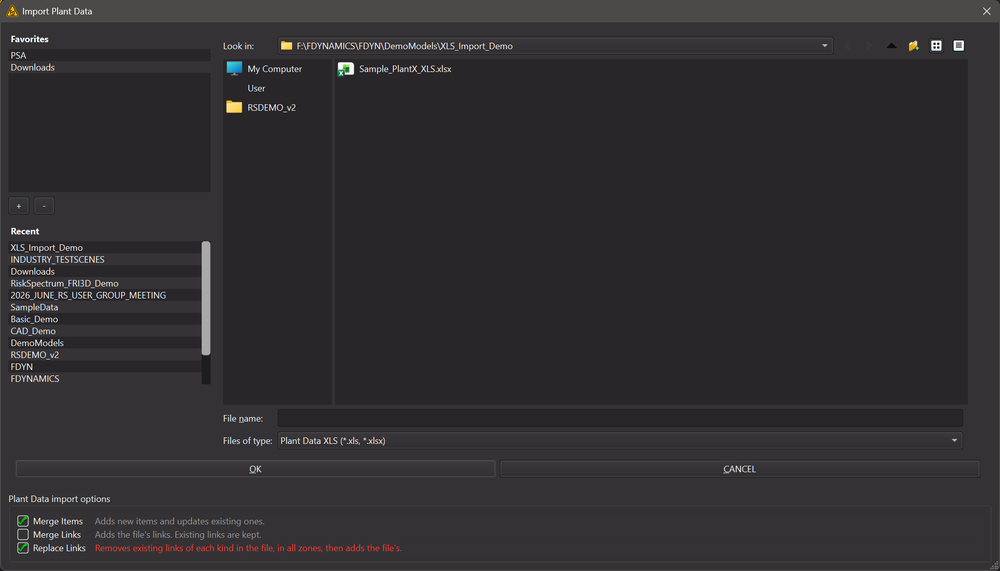
  2. Import into FRI3D:

    • Navigate to Store or Import menu in FRI3D
    • Select "Import Plant Data" or similar option
    • Choose your Excel file (.xls or .xlsx)
    • FRI3D will parse all worksheets and validate structure
  3. Verify Import:

    • Check import log for warnings or errors
    • Verify zones, components, and cables are correctly imported
    • Review relationships in the 3D view
  4. Use Imported Data:

    • Imported plant data is available for fire scenario analysis
    • Components and cables can be visualized in 3D
    • PRA data (basic events, scenarios) is integrated for risk analysis

Data Type Notes#

Boolean Values (InPRA fields)#

The following values are treated as TRUE:

  • TRUE (case-insensitive)
  • true
  • 1 (numeric)
  • Y (case-insensitive)
  • y

All other values are treated as FALSE.

Text Fields#

  • All text fields are case-sensitive for identifiers
  • Descriptions can contain any text
  • Empty cells are allowed for optional fields

Numeric Fields#

  • Use decimal notation (e.g., 1.0E-3 for scientific notation)
  • Negative values are allowed where applicable
  • Zero values are valid

Known Issues and Limitations#

  1. SpuriousBasicEvents Probability Column:

    • The code currently reads column 2 (Description) again instead of column 3 (Probability)
    • This is a known bug that may be fixed in future versions
    • Workaround: Ensure probability data is in column 2 until fixed
  2. Components InPRA Column:

    • Column 3 is ignored; InPRA must be in column 4
    • This is intentional based on the current implementation
  3. Unused Worksheets:

    • ItemTypes and CableTypes worksheets are not parsed
    • Data in these worksheets is ignored
    • Reserved for future functionality
  4. Relationship Validation:

    • FRI3D does not validate that referenced items exist
    • Ensure all ToItem references point to valid items
    • Missing references may cause import warnings

Best Practices#

  1. Worksheet Naming:

    • Use exact worksheet names (case-sensitive)
    • Avoid extra spaces or special characters
  2. Column Headers:

    • First row must contain exact column headers
    • Headers are case-sensitive
    • No extra spaces in header names
  3. Data Consistency:

    • Ensure unique identifiers across worksheets
    • Validate relationships before import
    • Use consistent naming conventions
  4. File Format:

    • Use .xlsx format for best compatibility
    • .xls format is also supported
    • Avoid password-protected files
  5. Testing:

    • Test with a small sample file first
    • Verify import log for errors
    • Check data integrity after import

Example Excel File Structure#

Excel File: plant_data.xlsx
โ”œโ”€โ”€ Zones (worksheet)
โ”‚ โ”œโ”€โ”€ Zone | Description | CADData
โ”‚ โ””โ”€โ”€ ...
โ”œโ”€โ”€ ZonesTo (worksheet)
โ”‚ โ”œโ”€โ”€ Zone | ToItem | ToItemType
โ”‚ โ””โ”€โ”€ ...
โ”œโ”€โ”€ Raceways (worksheet)
โ”‚ โ”œโ”€โ”€ Raceway | Description | Type | InPRA
โ”‚ โ””โ”€โ”€ ...
โ”œโ”€โ”€ Components (worksheet)
โ”‚ โ”œโ”€โ”€ Component | Description | (ignored) | InPRA
โ”‚ โ””โ”€โ”€ ...
โ”œโ”€โ”€ Cables (worksheet)
โ”‚ โ”œโ”€โ”€ Cable | Description | CableTypeID | InPRA
โ”‚ โ””โ”€โ”€ ...
โ”œโ”€โ”€ Scenarios (worksheet)
โ”‚ โ”œโ”€โ”€ Scenario | Description | IGF | SeverityFactor | NSP
โ”‚ โ””โ”€โ”€ ...
โ””โ”€โ”€ ... (other worksheets)

What's Next?#

After importing your Excel plant database:

  1. Import CAD Models - Import 3D geometry to visualize plant components
  2. Configure Fire Scenarios - Set up fire sources and analysis parameters
  3. Run Fire Simulations - Use imported basic events and scenarios for risk assessment
  4. Export to CAFTA - Export plant data and scenarios for PRA integration

Support#

For plant-specific database formats or custom import requirements:

  • Contact FRI3D support for assistance with importing specific database formats
  • Provide sample Excel files for format validation
  • Request custom field mapping if your database structure differs

Reach out

If you need help after reading this doc, email us [email protected] for an answer. .